
Customize Adobe Commerce Checkout to Drive Conversions
Optimize Adobe Commerce checkout for seamless UX and higher conversions. Learn to customize for growth and enhance your eCommerce performance.
12 min read
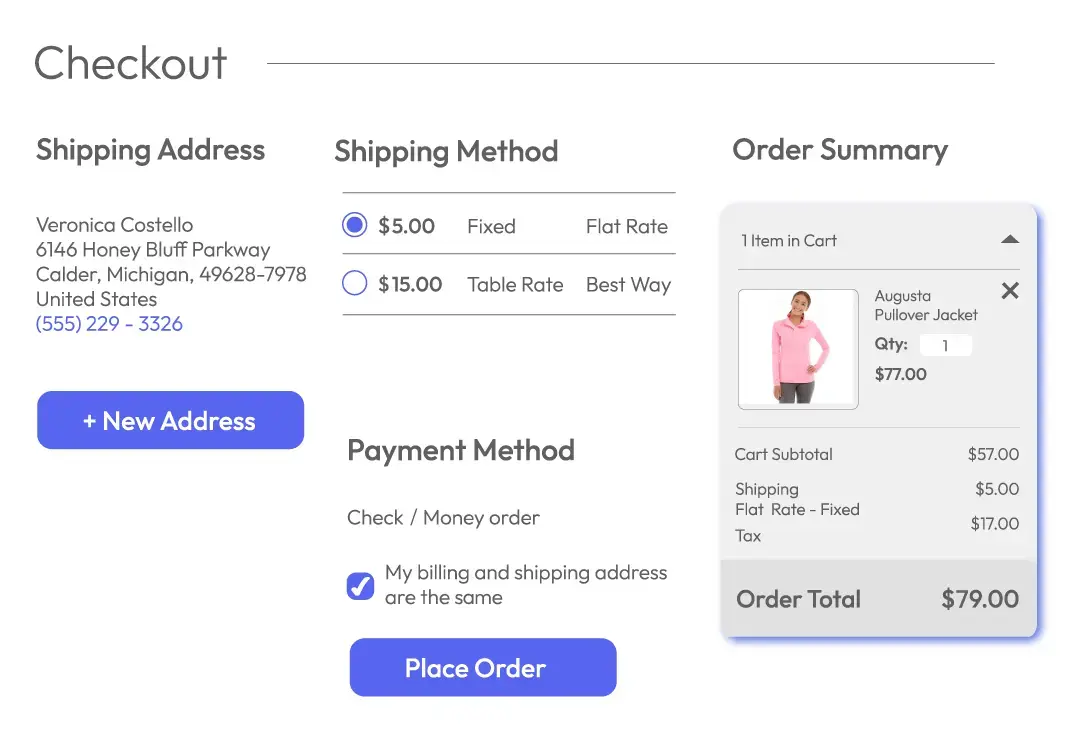
The checkout process represents one of the most critical stages in the entire eCommerce customer journey. When customers reach this pivotal moment, they have already navigated through product discovery, added items to their cart, and expressed genuine purchase intent.
Why Checkout Customization Matters
A streamlined, intuitive, and tailored checkout not only reduces cart abandonment but also enhances customer satisfaction and significantly boosts conversion rates across your store. For business owners and existing Adobe Commerce users, customizing the checkout process presents a powerful opportunity to align the platform with specific business needs.
Adobe Commerce offers unparalleled flexibility and scalability in checkout customization, empowering businesses to create workflows and features that enhance operational efficiency and support sustained growth. According to recent industry research, the average cart abandonment rate across eCommerce sites stands at approximately 69.57%, with checkout complexity cited as the primary reason customers leave without completing their purchases.
In this comprehensive guide, we explore high-level strategies for customizing Adobe Commerce checkout and the substantial benefits these customizations bring to your eCommerce operations.
Why Customize the Adobe Commerce Checkout?
Customizing the checkout process allows businesses to adapt to evolving customer expectations, industry trends, and unique operational requirements that vary across different business models and market segments.
Enhance the User Experience
A seamless checkout experience removes friction points that cause customer frustration and cart abandonment. Research from the Baymard Institute indicates that up to 21% of cart abandonment occurs due to a complicated or lengthy checkout process.
Support Business-Specific Needs
Every business operates according to unique operational requirements. A B2B wholesale operation requires functionality fundamentally different from a B2C retail store, including purchase order numbers, volume pricing tiers, and quote requests.
Increase Conversion Rates
Each percentage point improvement in checkout conversion rate translates directly into additional completed transactions and increased revenue. Industry data suggests that businesses implementing comprehensive checkout optimization strategies typically see conversion rate improvements ranging from 10% to 35%.
Enable Scalability
A well-customized checkout built on Adobe Commerce's robust architecture provides the scalability foundation needed to support future growth without requiring fundamental redesign or platform migration.
Key Statistics: The Impact of Checkout Optimization
According to industry research, businesses that implement comprehensive checkout optimization strategies typically experience conversion rate improvements ranging from 10% to 35%. The global average cart abandonment rate of 69.57% represents a significant opportunity for businesses that successfully reduce friction.
Key Areas for Checkout Customization
Successfully customizing the Adobe Commerce checkout requires a strategic approach that addresses the specific needs of your business while maintaining focus on the ultimate goal of improving customer experience and conversion rates.
1. Adding Custom Fields
Custom fields allow businesses to collect additional information from customers during checkout that goes beyond standard name, address, and payment data.
| Application | Description |
|---|---|
| B2B Orders | Add fields for purchase order numbers or tax exemption details |
| Gift Options | Enable customers to add personalized messages or select gift wrapping |
| Delivery Preferences | Allow customers to specify delivery windows or special instructions |
Implementation Best Practices
Creating custom fields requires developing a custom module that defines the field structure and integrates it into the appropriate checkout step. Critical to successful implementation is ensuring that field data is properly stored and visible in the admin order management system.
2. Checkout Flow Optimization
Every business operates differently, and the default checkout flow may not suit all needs. Adobe Commerce allows you to modify the sequence of steps or add/remove steps to create a more efficient process.
| Flow Type | Best For |
|---|---|
| Multi-Step Checkout | Complex orders, high-value items, or customers who prefer focused decision-making |
| One-Page Checkout | Streamlined purchases, repeat customers, or mobile-first experiences |
| B2B Checkout | Wholesale operations requiring quote requests or custom pricing approval |
A tailored checkout flow improves clarity and convenience for your customers, leading directly to fewer abandoned carts and higher satisfaction rates.
3. Payment Gateway Customization
Providing a variety of payment options is crucial for catering to diverse customer preferences. Adobe Commerce supports integration with multiple payment gateways.
| Payment Feature | Business Impact |
|---|---|
| Local Payment Options | Add region-specific methods such as local e-wallets or bank transfers |
| Subscription Payments | Enable recurring billing for subscription-based services |
| Buy Now, Pay Later | Offer flexible payment plans to boost conversions |
Critical considerations include ensuring PCI compliance, verifying that refund and void functionality works correctly, and confirming that payment status updates sync properly with order management workflows.
4. Tailored Shipping and Tax Rules
Efficient shipping and accurate tax calculations are essential for providing a transparent and reliable checkout experience.
Customization Capabilities
Dynamic Shipping Rates: Adjust rates based on location, weight, or order value. Real-Time Shipping Estimates display estimated delivery dates and shipping costs during checkout.
Tax Rules: Configure tax calculations for different regions or customer types (e.g., B2B vs. B2C).
Providing clear shipping and tax details builds customer trust and reduces confusion that leads to cart abandonment.
5. Personalization and Dynamic Content
Adobe Commerce's checkout system supports personalization features that cater to individual customers, enhancing the overall experience.
| Feature | Benefit |
|---|---|
| Saved Checkout Details | For returning customers, pre-fill shipping and billing information |
| Dynamic Promotions | Display targeted discounts based on cart value or customer history |
| AI-Powered Suggestions | Recommend complementary products or upsell items during checkout |
Personalized checkout experiences create a sense of value and convenience for customers that encourages loyalty and repeat business.
6. Headless Checkout for Omnichannel Experiences
For businesses looking to innovate, Adobe Commerce's headless commerce capabilities allow for custom front-end experiences.
Advantages of Headless Checkout
Consistency Across Channels: Deliver a uniform checkout process across web, mobile, in-store kiosks, and more.
Customization Flexibility: Use APIs to build checkout experiences that align with your brand's specific needs.
Future-Proofing: Quickly adapt to emerging technologies without overhauling the entire system.
Best Practices for Checkout Customization
- Focus on Speed and Simplicity: Ensure the checkout process is fast and intuitive, minimizing the steps required to complete a purchase.
- Prioritize Mobile Optimization: With mobile commerce on the rise, design a responsive and mobile-friendly checkout experience.
- Maintain Security Standards: Implement PCI compliance measures and secure payment gateways to protect customer data.
- Test Before Deployment: Use a staging environment to thoroughly test all customizations before rolling them out to your live store.
Benefits for Business Owners
| Benefit Area | Impact |
|---|---|
| Increased Revenue | A smoother checkout leads to higher conversions and larger order values |
| Operational Efficiency | Automating workflows saves time and reduces errors |
| Brand Differentiation | A unique checkout experience helps your brand stand out |
Ready to Transform Your Adobe Commerce Checkout?
Partner with CLEARgo, a trusted Adobe Commerce Partner, to take your eCommerce business to the next level. Our expertise ensures seamless scalability, enabling your store to grow effortlessly as your business expands.
Contact our team today for a comprehensive consultation and take the first step toward transforming your eCommerce operations.
Conclusion
The Adobe Commerce checkout process represents a powerful tool that, when customized effectively according to your specific business requirements and customer expectations, can drive significant and measurable business growth. By aligning the checkout experience with your operational needs through strategic customization of fields, flows, payments, shipping, personalization, and emerging headless capabilities, you can substantially reduce cart abandonment, boost conversion rates, and build lasting customer loyalty.
Ready to optimize your checkout and unlock the revenue potential of your Adobe Commerce store? Contact CLEARgo today for a consultation.
Frequently Asked Questions
What is the average cost of Adobe Commerce checkout customization?
The cost varies significantly based on scope and complexity, ranging from a few thousand dollars for basic customizations to significantly more for comprehensive headless implementations.
How long does it take to implement checkout customizations?
Timelines depend on complexity—simple customizations can be completed in days while comprehensive optimizations may require several weeks to months.
What is the expected ROI from checkout optimization?
Checkout optimization typically delivers 10-35% conversion rate improvements, representing significant revenue potential for stores of any size.
Can I customize Adobe Commerce checkout without technical expertise?
Basic configurations can be managed through the admin interface, but meaningful customizations require developer resources.
How do I prioritize checkout customization initiatives?
Prioritization should be based on performance data, customer feedback, and business requirements, focusing on highest-impact issues first.
What mobile optimization considerations are most important?
Mobile optimization requires large touch targets, appropriate input types, optimized page load, and mobile-friendly payment options.
How often should checkout performance be reviewed?
Monitor monthly, conduct quarterly analysis, and perform annual comprehensive reviews.
What security requirements apply to checkout customization?
Requirements include PCI DSS compliance, data protection regulations like GDPR and CCPA, and Adobe's security best practices.
More Insights
Continue exploring CLEARgo thinking
AI Commerce
AI-Powered CRM: From Consultative Chat to Personalized Offers
AI is rewriting CRM: consultative chat that sells, recommendations that learn, outreach timed to real behavior, segments that update themselves, and offers that land at the exact moment of decision. Five shifts that turn customer data into revenue.
Insights
Implementing BOPIS and Click-and-Collect in 2026: The Omnichannel Playbook
Buy-online-pickup-in-store turns your shops into fulfillment assets — if inventory, POS and notifications actually work together. The 2026 playbook for getting BOPIS right the first time.
Insights
The E-commerce Seasons Calendar for Hong Kong & SEA Retailers (2026–27 Edition)
From 11.11 to Chinese New Year: the campaign dates that matter in Hong Kong and Southeast Asia for late 2026 and 2027 — and how far ahead each one really needs to be planned.